Git is one of those tools that starts simple and quietly becomes a source of organizational friction as projects grow. What begins as a clean branching strategy often degrades into long-lived branches, confusing merges, broken CI pipelines, and “who changed this?” moments in production.
The problem usually isn’t Git itself. It’s that teams adopt workflows without designing for scale, coordination, and human behavior under pressure.
This guide focuses on Git workflows that stay stable as teams and codebases grow—without turning into chaos.
Why Git Workflows Break Down
Most Git chaos comes from a few predictable causes:
- branches live too long
- merges happen unpredictably
- ownership is unclear
- CI is optional instead of enforced
- no shared definition of “done”
Under pressure, teams optimize for speed, not structure. Over time, that creates:
parallel timelines of code that never fully reconcile
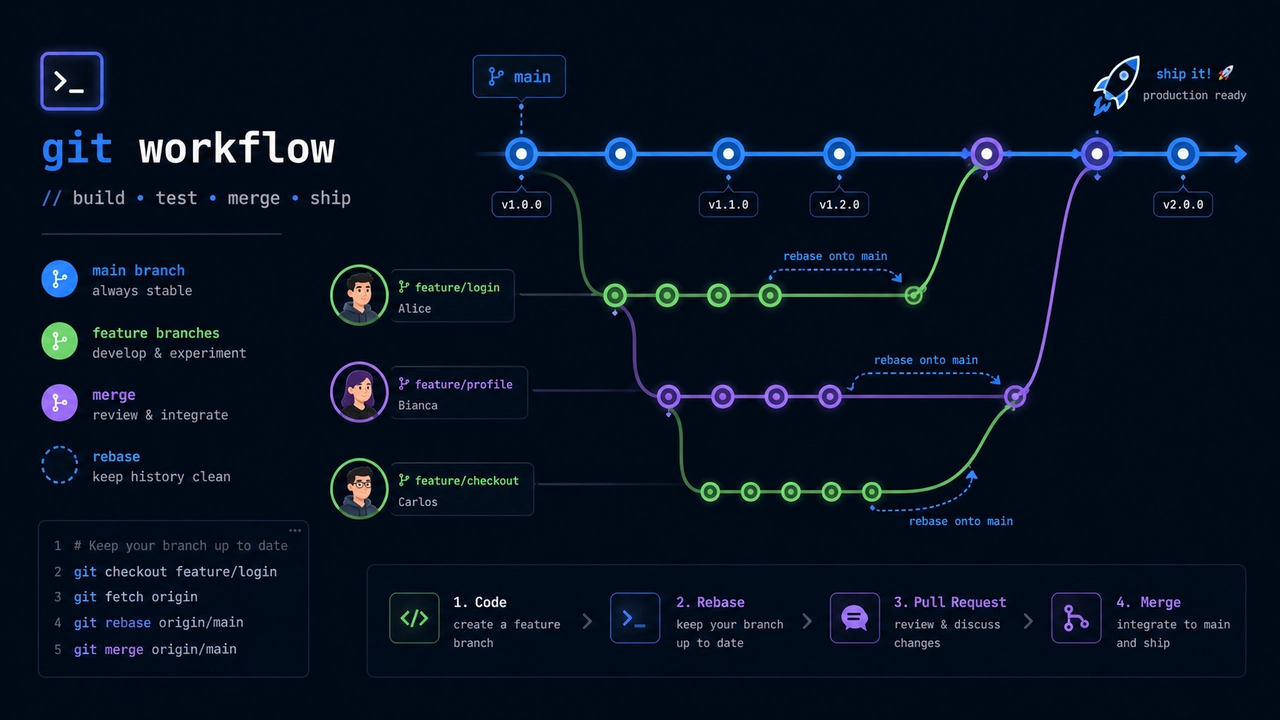
Principle #1: Keep Branch Lifetimes Short
The longer a branch exists, the more it diverges from reality.
A simple rule:
Branches should live in hours or days, not weeks.
Why this matters:
- reduces merge conflicts
- keeps context fresh
- prevents “integration surprise”
- improves review quality
Healthy pattern:
- small feature branch → quick review → merge
Unhealthy pattern:
- feature branch → 3 weeks of divergence → painful merge storm
Principle #2: Make Main Branch Always Deployable
Your main branch (often main or master) should represent:
“This code is safe to deploy right now”
Not:
- “almost finished features”
- “partially tested changes”
- “waiting for final review”
This requires discipline:
- CI must pass before merge
- tests must be meaningful
- broken builds are treated as urgent
When this rule is enforced, Git becomes predictable instead of fragile.
Principle #3: Prefer Trunk-Based Development (With Guardrails)
One of the most stable workflows is trunk-based development.
Structure:
main (trunk)
  ↑
short-lived feature branches
Key characteristics:
- frequent merges into main
- small incremental changes
- feature flags instead of long-lived branches
Why it works:
integration happens continuously instead of in large, painful bursts
Principle #4: Avoid Long-Lived Feature Branches
Long-lived branches create parallel realities in your codebase.
Problems include:
- merge conflicts multiply over time
- CI drift (tests pass in branch, fail in main)
- hidden dependencies accumulate
- reviewers lose context
If a feature is large:
- split it into smaller deliverables
- merge incrementally
- use feature flags instead of delaying integration
Principle #5: Use Feature Flags Instead of “Branch Isolation”
Instead of keeping unfinished work in a branch, integrate it early but hide it behind a flag.
Example:
if (featureFlagEnabled("new-checkout")) {
    useNewCheckoutFlow()
} else {
    useOldCheckoutFlow()
}
Benefits:
- code is integrated early
- production remains stable
- testing happens in real environment
- rollback is instant
This is one of the most effective ways to reduce Git chaos.
Principle #6: Define a Clear Merge Strategy
Most chaos comes from inconsistent merging styles.
Pick one:
Option A: Squash merges
- clean history
- one commit per feature
- simpler rollback
Option B: Rebase + merge
- linear history
- more granular commits
- better traceability
Avoid mixing styles randomly
Consistency matters more than perfection.
Principle #7: Make Code Review Fast and Mandatory
Git workflows fail when reviews become:
- optional
- slow
- superficial
A good system enforces:
- small pull requests
- fast review cycles
- clear ownership of review responsibility
Rule of thumb:
If a PR is too large to review in 15–30 minutes, it is too large.
Principle #8: Treat CI as Part of Git, Not an Add-On
Continuous Integration is not a separate system—it is part of your Git workflow.
CI should:
- run automatically on every PR
- block broken merges
- validate formatting, tests, and linting
If CI is optional, Git becomes unreliable.
Principle #9: Avoid “Branch Naming Anarchy”
Branch naming seems trivial, but it becomes critical at scale.
Bad:
fix1
newstuff
test
update
Good:
feature/auth-login
bugfix/payment-timeout
refactor/user-service
Why it matters:
- improves searchability
- clarifies intent
- helps automation tools
- reduces cognitive load
Principle #10: Keep the Number of Active Branches Low
More branches = more coordination overhead.
Healthy teams:
- keep PRs small
- merge frequently
- avoid parallel long-running work streams
If you see many open branches:
it’s usually a sign of coordination problems, not productivity
Principle #11: Make Conflicts a Signal, Not a Surprise
Merge conflicts are not inherently bad—they are feedback.
But in a healthy workflow:
- conflicts are small and frequent
- not large and catastrophic
If conflicts are consistently large:
- branches are too long-lived
- team is working too independently
- integration is delayed too much
Principle #12: Protect Main Branch Without Blocking Flow
Branch protection rules are essential:
- require CI pass
- require review approval
- prevent direct pushes
But over-protection can slow teams down.
Good balance:
- strict on quality
- flexible on contribution flow
Principle #13: Document “How We Use Git Here”
Most Git chaos is not technical—it’s social.
Teams need clarity on:
- when to branch
- how long branches should live
- how reviews are handled
- merge strategy rules
Even a simple internal guideline prevents:
every developer inventing their own workflow
The Modern Reality: AI Is Changing Git Workflows Too
AI-assisted development is subtly changing Git behavior:
- more frequent small changes
- faster feature generation
- more generated boilerplate commits
- higher velocity of PR creation
This means:
Git workflows must optimize for speed of integration, not just control
Slow workflows become bottlenecks.
A Simple Stable Workflow (Recommended Baseline)
Here’s a minimal, scalable Git setup:
Branching:
mainis always deployable- short-lived feature branches only
Workflow:
- create branch from main
- implement small change
- open PR quickly
- run CI automatically
- review fast
- merge immediately after approval
Optional:
- feature flags for incomplete work
- squash merges for clean history
This setup scales well from 1 developer to large teams.
Common Failure Patterns
1. “Big Bang” feature branches
Large branches that integrate everything at once.
2. Delayed integration
Work stays isolated too long.
3. Inconsistent merging strategy
Different styles across team members.
4. PRs as documentation
Using PRs as planning tools instead of integration tools.
5. Weak CI enforcement
Broken builds slipping into main branch.
Final Thoughts
Git workflows don’t become chaotic because Git is complex. They become chaotic because teams underestimate the importance of continuous integration discipline.
The goal of a good workflow is not control for its own sake. It is:
predictable integration under constant change
When Git is working well, it becomes almost invisible:
- branches are short
- merges are routine
- main is always stable
- reviews are fast
- CI quietly enforces quality
That is the real signal of a healthy system—not the number of branches, but the absence of fear around merging code.